

Agency access in the bluetronix app – extend your admin rights for PHP & MySQL
This tutorial shows you how to apply for agency access and thereby gain access to advanced features like PHP, MySQL, and client management – perfect for agencies, developers, and experienced users.
Der Agenturzugang in der bluetronix App
In this tutorial, you will learn how to apply for Agency Access and unlock advanced features in the bluetronix App.
By default, you start as an Admin. This allows you to complete many tasks, but you cannot perform programming with PHP or MySQL. These advanced access rights are only obtained with agency access.
Wenn du Webentwickler bist, eine Agentur betreibst oder zu den erfahrenen Nutzern zählst, kannst du den Antrag unter Projekt ⯈ Agentur Zugang stellen.
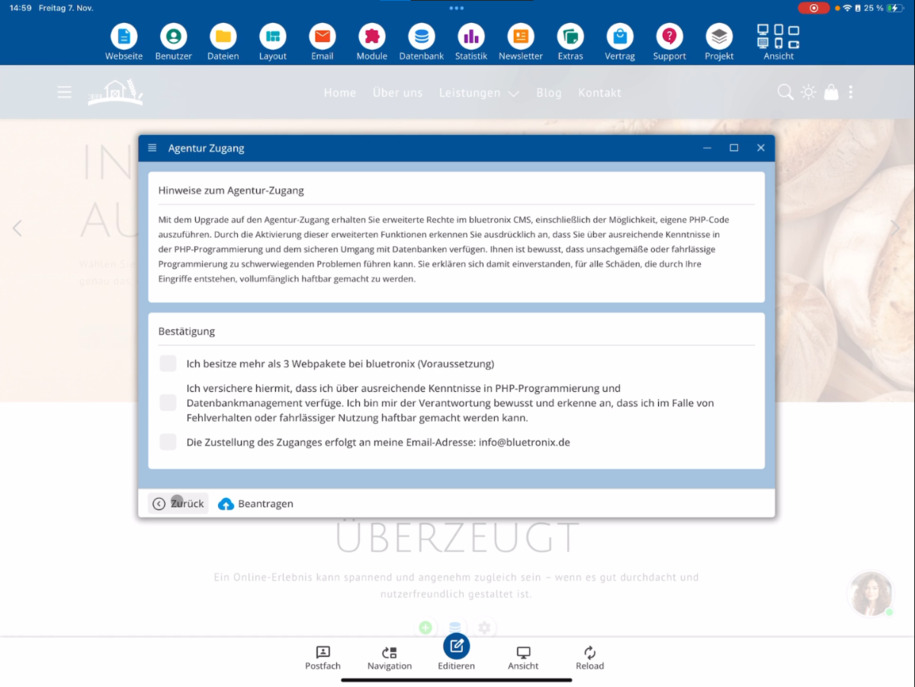
Der Antrag ist an bestimmte Bedingungen geknüpft, die direkt unter dem Formular erklärt werden. Reiche den Antrag anschließend ein, um deinen Zugang zu erweitern.
After activation, you will receive new login credentials via email. From this point on, you will no longer log in as an Admin, but as an A-Admin – which stands for Agency Admin. This gives you an additional account.
With the Agency Admin, for example, you can provide your clients with the regular admin account and specify exactly which areas they are allowed to edit within the platform. This creates a clear and secure user structure.
Vorteile des Agenturzugangs
As an agency or developer, you have master rights. This allows you to program your own applications with PHP, access MySQL databases, and develop custom solutions for your clients.
Du kannst außerdem die Rechte deiner Kunden individuell einschränken – je nach Sicherheitsbedarf und Projektanforderung. So entscheidest du, welche Änderungen der Kunde an seiner Webseite vornehmen darf.
Furthermore, you can grant your clients access to databases, email, and – if desired – also to the newsletter section.
Beachte, dass der Agenturzugang nur erfahrenen Nutzern vorbehalten ist, die über entsprechende technische Kenntnisse verfügen. Mit diesen Rechten erhältst du tiefgreifenden Zugriff auf das System.
FAQ
what customers often ask us
Agency Access provides you with extended rights, enabling you as a web developer or agency to implement complex projects. You gain access to PHP, MySQL, and can manage user rights individually.
Wie beantrage ich den Agenturzugang?
Du stellst den Antrag in der App unter Projekt ⯈ Agentur Zugang. Die Bedingungen für den Zugang werden dir dort erklärt. Nachdem du den Antrag eingereicht hast, erhältst du per E-Mail neue Zugangsdaten.
Was passiert nach der Freischaltung?
After activation, you will receive an additional account and will log in as an A-Admin (Agency Admin) from now on. The existing Admin account will remain and can, for example, be handed over to your client.
Was ist der Unterschied zwischen Admin und Agentur-Admin?
As a regular Admin, you can manage content and change settings, but you cannot perform programming. The Agency Admin has master rights and can work with PHP and MySQL, as well as manage the rights of other users.
Kann ich meinen Kunden eingeschränkte Zugänge geben?
Ja. Mit dem Agenturzugang kannst du für jeden Kunden festlegen, welche Bereiche er bearbeiten darf. So entsteht eine klare Benutzerstruktur, die du individuell anpassen kannst.
Welche zusätzlichen Funktionen stehen mir als Agentur zur Verfügung?
You can program with PHP, manage MySQL databases, and if desired, give your clients access to databases, email, and newsletters. This allows for more flexible project design.
Wer sollte den Agenturzugang beantragen?
Der Agenturzugang richtet sich an erfahrene Anwender, Webentwickler und Agenturen, die erweiterte Funktionen und volle Kontrolle über Kundenprojekte benötigen.