

Transfer domain to bluetronix via Outcode
This section shows how to move an existing domain via an outcode from an external provider to bluetronix. After that, you can use your existing address directly with your bluetronix system.
Access the Domain Order section
Start the bluetronix CMS, select the Extras menu, and then Domain. There you will find the Order Domain option to initiate the transfer for an existing address.
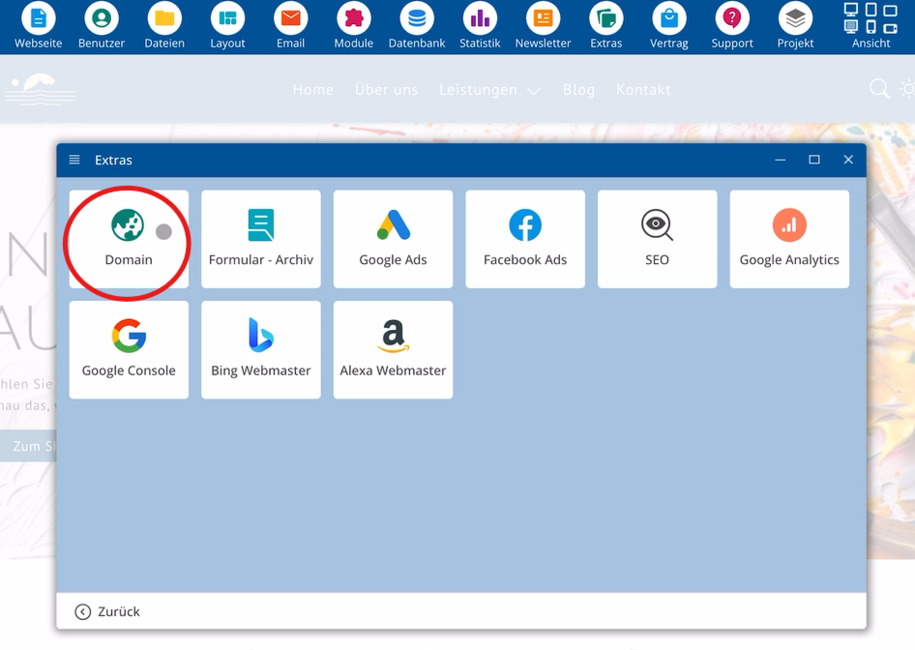
Enter the existing domain
Use Order Domain and enter your already registered address, for example bluetronix.com. Then click on Order.
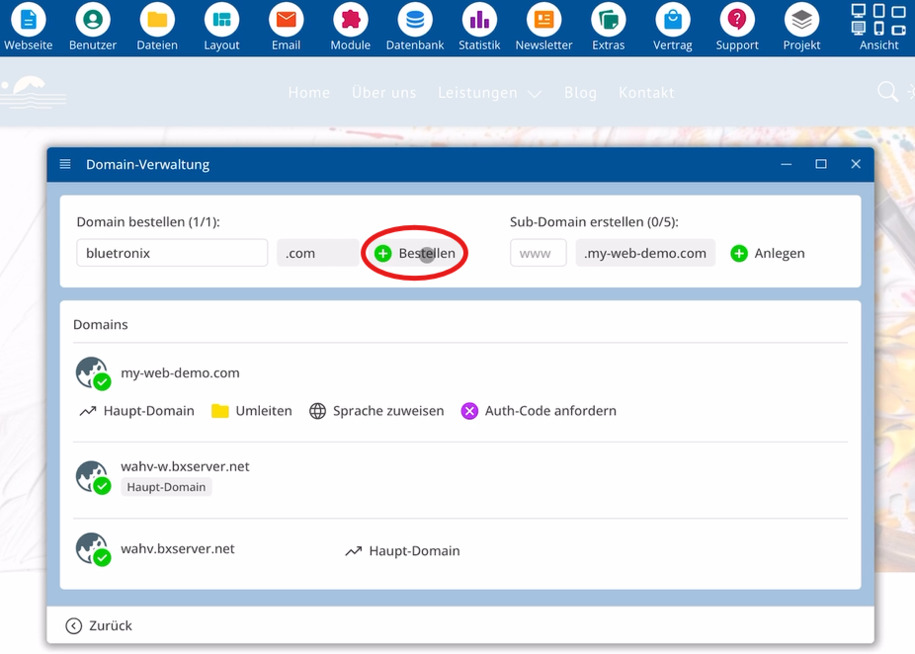
For orientation, use the following details for this order:
⯈ Domain – already registered address, such as bluetronix.com
⯈ External Provider – previous provider of your domain
⯈ Outcode – release code for the transfer
For better overview, you can switch to full screen if needed.
Option 1: Transfer via Outcode
Your existing domain can be connected to bluetronix in two ways. This guide describes Option 1, the transfer via outcode.
You can obtain the outcode from your current provider. Typically, the management interface offers a direct function to request this code. If you can't find a suitable function, your provider's support can assist.
Enter outcode and start transfer
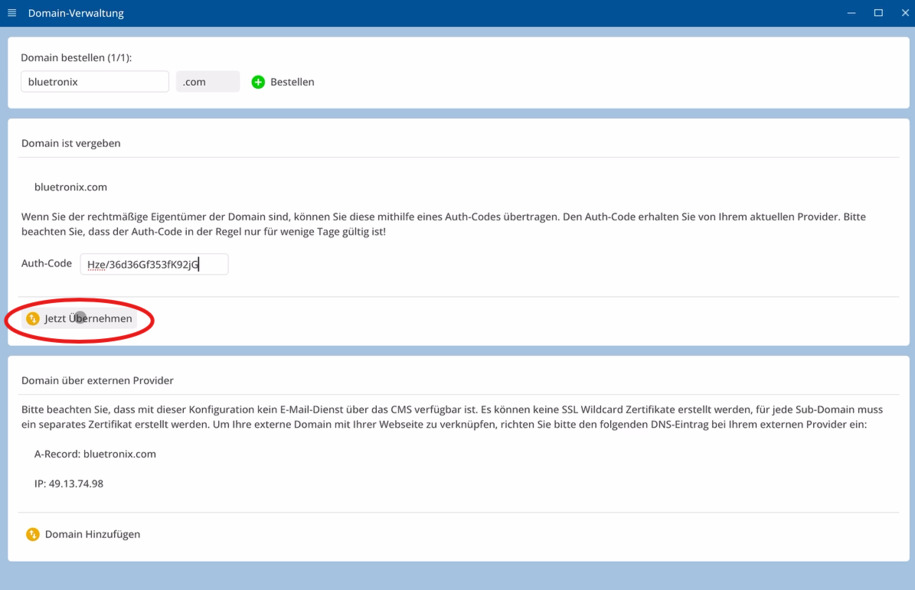
Once you have the outcode, enter this value in the section for the existing domain.
Then click on Transfer Now to start the transfer.
By transferring via outcode, you move the domain from your previous provider to bluetronix. The basis for this step is the outcode you received from your external provider.
FAQ
what customers often ask us
What does transfer via outcode to bluetronix mean?
You are using a domain that has already been registered with an external provider and are transferring this address to bluetronix. The basis for this is an outcode that you obtain from your previous provider.
Where do I start the domain transfer?
Open the bluetronix CMS, select Extras and then Domain. There, use Order Domain, enter your existing address, and click on Order.
How do I enter my existing domain?
Go to Order Domain, enter your already registered address, such as bluetronix.com, and confirm by clicking Order. Then prepare for the transfer via outcode.
How do I get the outcode for my domain?
You will receive this code from your current provider. Often, your provider's management interface has a function that allows you to request the Outcode.
What should I do if I can't find the Outcode function?
If you don't see a menu item for the Outcode, contact the support of your current provider and ask for the code for your domain.
When do I enter the Outcode within the CMS?
As soon as you have the Outcode, you enter this value when adding the existing domain. Then click on Apply Now to start the transfer to bluetronix.
Are there other ways to connect my domain with bluetronix?
Yes, according to the interface, two ways are available. This description focuses on variant 1, the transfer via Outcode. Other variants will follow separate instructions.