

Make website accessible via www.subdomain.de
This section explains how to additionally access your site via an address with a www prefix and, if desired, use this address as the main domain.
Access the Extras > Domain section.
Switch to the bluetronix CMS and select Extras then Domain.
Create www subdomain.
By default, your site runs through the main domain. This variant appears more modern and remains shorter when inputting.
If you want to use an address with a www prefix, enter the desired subdomain on the right under the domain settings, for example www.subdomain.de, and click Create.
The new entry www.subdomain.de will appear at the bottom.
Important elements in this step:
⯈ Main Domain – central address of your site without the www prefix
⯈ Subdomain – additional address, for example www.subdomain.de
⯈ Create – creates the entry for your subdomain.
Set www.subdomain.de as the main domain.
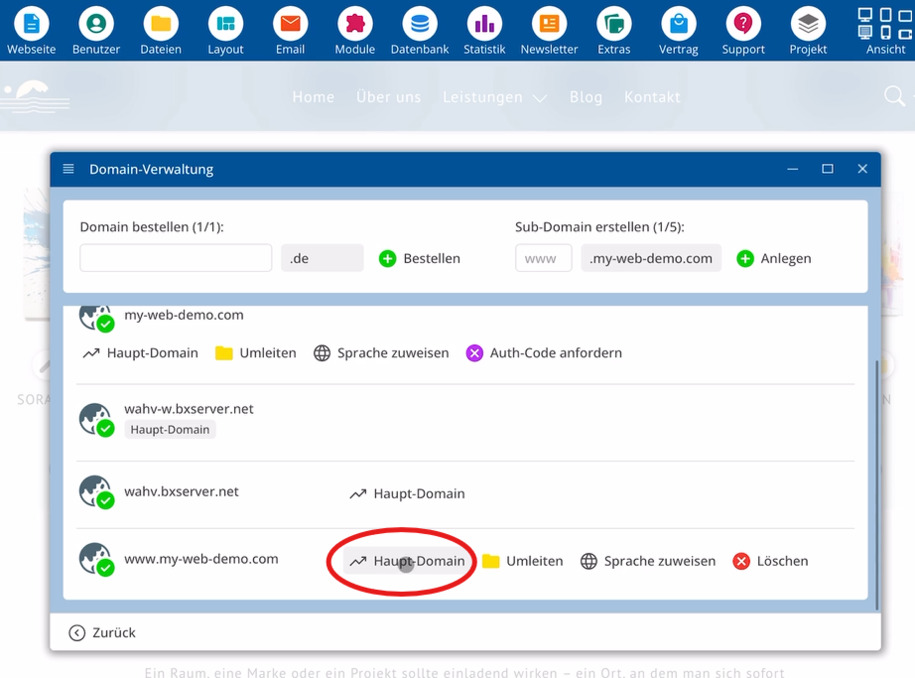
You will see www.subdomain.de as an entry at the bottom. Here, you can mark this subdomain as Main Domain if needed.
With this selection, a visitor will primarily access your site via www.subdomain.de.
FAQ
what customers often ask us
Why does my site run first through the main domain?
Without any changes, you use the main domain, as this variant appears more modern and remains shorter when inputting.
How do I open the management for domains?
Start the bluetronix CMS, click on Extras and select Domain. On the right, an overview of the main domain and possible subdomains appears.
How do I create www.subdomain.de?
Enter www.subdomain.de as the desired subdomain in the Domain settings on the right and click Create. The new entry will then appear below.
Can my site also be accessible via www.subdomain.de?
Yes, in addition to the main domain, you can access your site via www.subdomain.de once you have created this subdomain.
How do I set www.subdomain.de as the main domain?
Once www.subdomain.de appears as an entry at the bottom, select this entry and mark the subdomain there as Main Domain.
How can I tell that www.subdomain.de has been successfully created?
After creation, the entry www.subdomain.de will appear in the Domain list below. This entry shows that the subdomain exists and can be used as a Main Domain if needed.