

PHP execution order: Header, main page, and footer
This developer tutorial shows you when the individual PHP scripts are executed based on a basic layout with bx_Header.html, index.html, and bx_Footer.html. You will learn how the content of $LayoutHTML is expanded step by step and where you can make page-dependent or global changes.
Requirements and goal
For this developer tutorial, you should understand how the bluetronix CMS composes a page from its layout, the header, the main page, and the footer. We will show you the order in which the PHP scripts of these areas are executed and which parts of $LayoutHTML are already loaded.
In this example, the basic layout consists of the CMS files bx_Header.html, index.html, and bx_Footer.html. The main page index.html represents the currently called HTML page.
Basic layout: Header, main page, and footer
The basic layout determines the order in which the three areas are included. In the example shown, you will find the layout definition in the table 00_layout.
The relevant excerpt of the layout looks like this:
__DB_Layout_/bx_Header.html__
<main>
   __DB_Layout_Main__
</main>
__DB_Layout_/bx_Footer.html__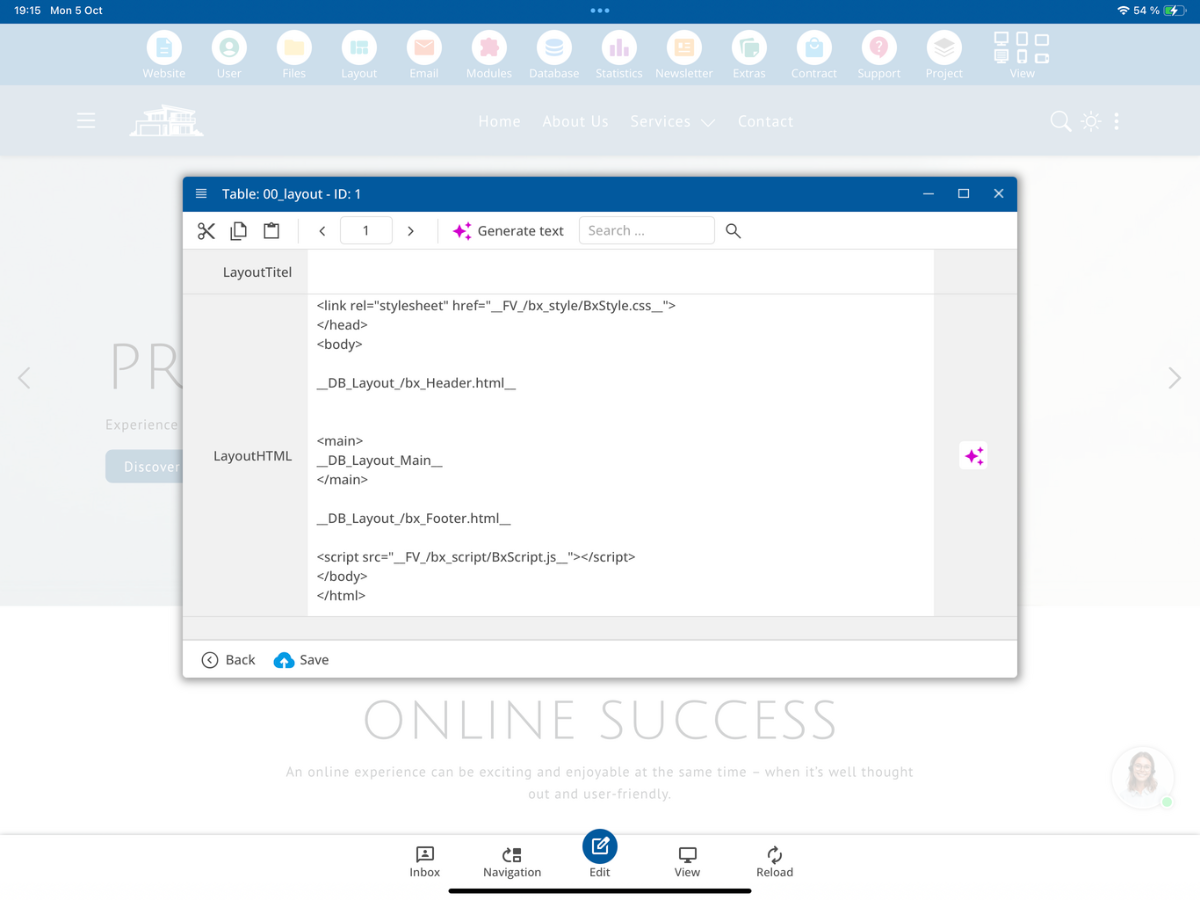
The first placeholder includes bx_Header.html. Within the main element, the currently requested page is included via __DB_Layout_Main__, in our example index.html. It is followed by bx_Footer.html.
Although the layout definition contains all three areas, the respective HTML content for the PHP code of the individual areas is loaded gradually into $LayoutHTML.
1. The PHP code of the header is executed first
Open the File Manager and go to the file bx_Header.html. You can edit the PHP code of this area via PHP Code.
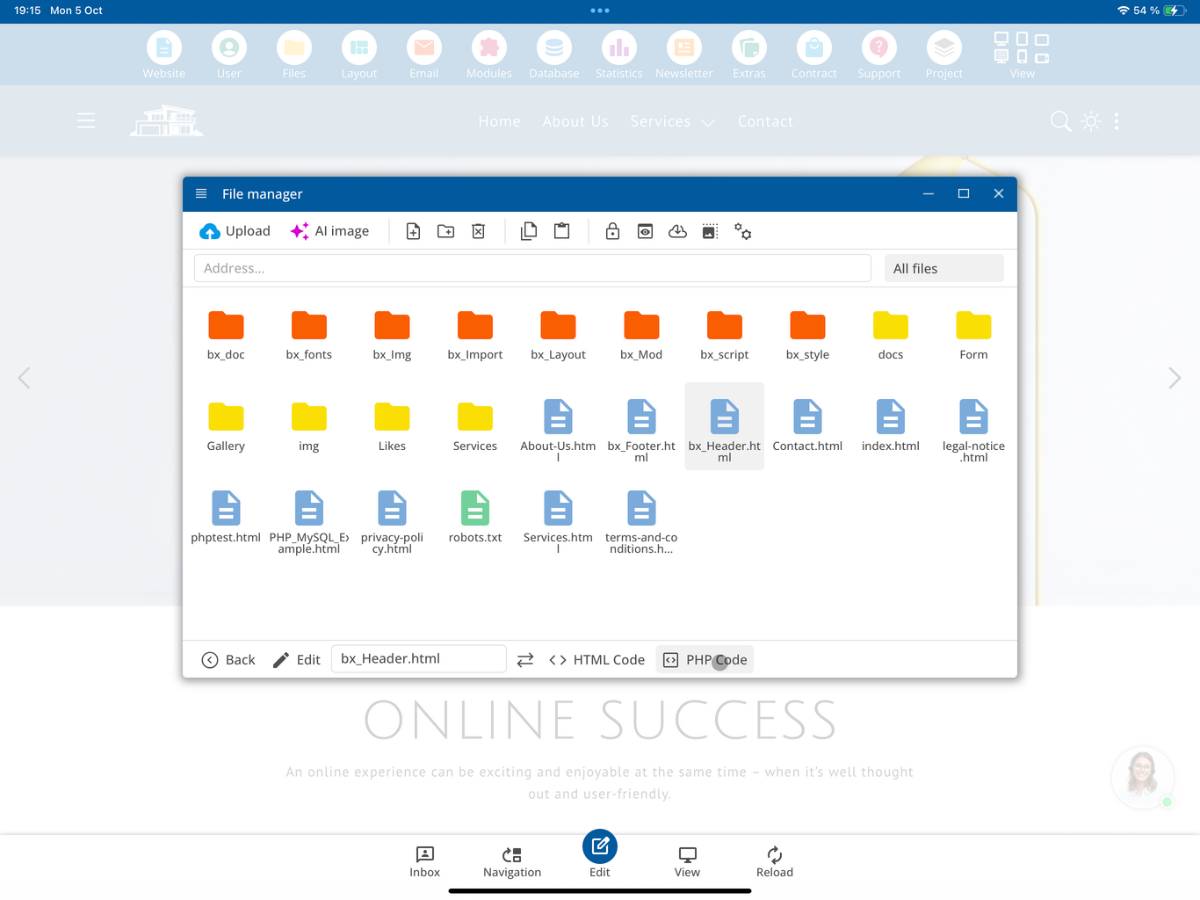
The header is the first loaded page area. While its PHP code is executing, $LayoutHTML therefore contains only the HTML from bx_Header.html.
PHP-Code: bx_Header.html

$LayoutHTML enthält:
   bx_Header.html
Here, for example, you can replace placeholders in the header or prepare the navigation. You cannot yet access the actual HTML content of index.html or bx_Footer.html via $LayoutHTML at this point.
2. The PHP code of the main page is executed next
After the header, the CMS loads the called main page, here index.html, and executes its PHP code. At this point, $LayoutHTML contains both the HTML code of the header and the HTML code of the main page.
PHP-Code: index.html

$LayoutHTML enthält:
   bx_Header.html
   index.html
This allows the PHP code of the main page to not only replace its own placeholders but also modify any placeholders already present within the header.
For example: If your header contains the placeholder __HeaderClass__, you can replace it from the main page:
$LayoutHTML = str_replace("__HeaderClass__","active",$LayoutHTML);Thus, a specific main page can mark its menu item as active within the already loaded header.
The footer has not yet been loaded at this point. Therefore, its HTML content cannot yet be reliably modified via $LayoutHTML.
3. PHP code of the footer is executed last
Finally, the CMS loads bx_Footer.html and executes its PHP code. Now $LayoutHTML contains the HTML content of all three areas.
PHP-Code: bx_Footer.html

$LayoutHTML enthält:
   bx_Header.html
   index.html
   bx_Footer.html
The footer PHP code can therefore replace placeholders within the header, main page, or footer, as long as they are still present at this point.
If the already loaded HTML contains the placeholder __MyTitle__, you can replace it there:
$LayoutHTML = str_replace("__MyTitle__","My Custom Title",$LayoutHTML);The footer is also suitable for common adjustments that should only be made after loading the entire page structure.
Execution order at a glance
The crucial rule is: PHP can only modify the HTML areas that have already been loaded at this point via $LayoutHTML.
1. bx_Header.html
   PHP sieht: Header
        ↓
2. index.html
   PHP sieht: Header + Hauptseite
        ↓
3. bx_Footer.html
   PHP sieht: Header + Hauptseite + Footer
If, for example, you want to control a header placeholder from a specific page, you would use the PHP code of that main page. If a placeholder should be replaced in all three already loaded areas, the PHP code of the footer that is executed last is a good choice.
Important for your own PHP functions
When defining your own PHP functions in different areas, ensure that the same function is not defined multiple times during a page request. Use unique function names or check if the function already exists before defining it.
if(!function_exists("MyTemplateFunction")) {
   function MyTemplateFunction() {
      return true;
   }
}
Summary
In our basic layout, the PHP code from bx_Header.html runs first, followed by the PHP code from index.html, and finally the PHP code from bx_Footer.html. With each step, the HTML content you can access via $LayoutHTML expands.
Place your PHP code where the necessary HTML sections are already loaded: in the header for header-specific adjustments, in the main page for custom content and the previously loaded header, or in the footer for changes to the already assembled layout.
FAQ
what customers often ask us
In what order are the PHP scripts executed?
First, the PHP code from bx_Header.html is executed, followed by the PHP code of the main page, such as index.html, and finally the PHP code from bx_Footer.html.
Which HTML sections does $LayoutHTML contain during the header PHP code?
During the execution of the header PHP code, $LayoutHTML contains only the already loaded HTML content from bx_Header.html.
Can the main page alter the HTML code of the header?
Yes. When the PHP code of the main page is executed, the header and main page are already included in $LayoutHTML. This allows you to replace a previously defined placeholder in the header.
Why can't the header PHP code change the footer yet?
The footer is loaded only after the main page. Therefore, its HTML content is not yet present in $LayoutHTML during the header PHP code.
Which areas can the footer PHP code alter?
At the time of the footer execution, $LayoutHTML already contains the header, the main page, and the footer. Any remaining placeholders in these areas can be replaced there.
Where can I see the structure of the basic layout?
The layout definition is displayed in the example in the table 00_layout. It includes bx_Header.html, the current main page, and bx_Footer.html.
Where can I edit the PHP code of bx_Header.html?
Select bx_Header.html in the File Manager and open PHP Code.
What should I keep in mind for my own PHP functions in the header and main page?
Custom functions must not be defined multiple times with the same name during a page request. Use unique names or check before definition with function_exists() whether the function already exists.